

TaffyGoTaffyGo
Get it

A browser that does the busywork with you.

TaffyGo is a Chromium browser for Android. It blocks ads and trackers, and its built-in assistant, Taffy, can answer from the page you're on or run an errand across a few sites while you watch. Taffy uses the AI provider you connect.

Both are free. The APK comes from GitHub Releases.

Read the source on GitHub
  • Free
  • No account
  • No TaffyGo server
  • Open source
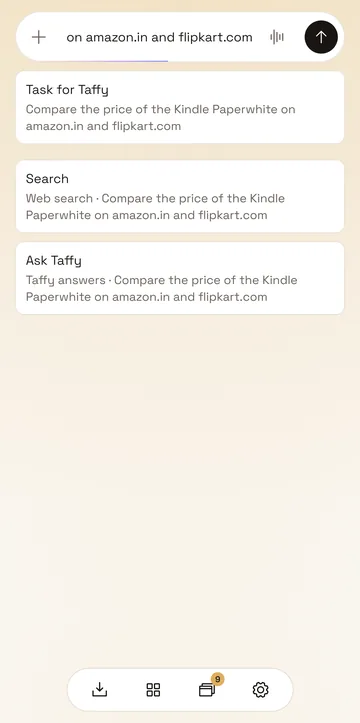
TaffyGo's start page with a request typed into its one box. The app offers it three ways: as a task for Taffy, as a search, or as a question for Taffy.
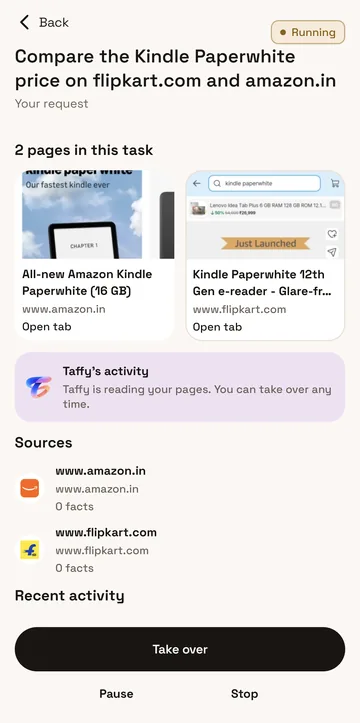
An errand running: Taffy compares a Kindle Paperwhite's price on flipkart.com and amazon.in. The screen shows the two pages, what Taffy is doing, and Take over, Pause and Stop.
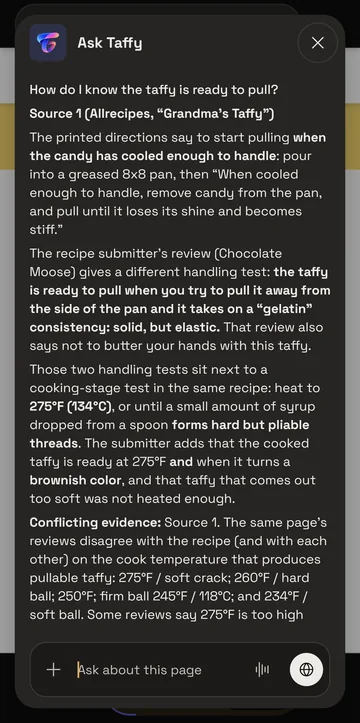
Taffy answering a question about a recipe page in the dark theme, naming its source and pointing out where the page's reviews disagree.

What it does

Every screen on this site is a capture from the app on an Android phone, taken in September 2026.

Ads and trackers are blocked from the start

Blocking is on for every site until you turn it off for one. The page sheet counts what was stopped on the page you're reading.
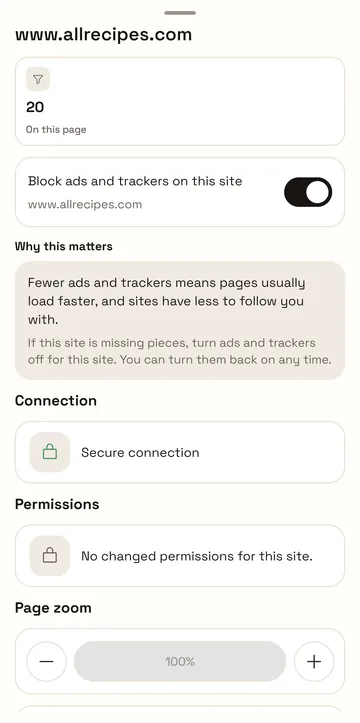
The page sheet for allrecipes.com: 20 ads and trackers blocked on this page, and a switch that blocks ads and trackers on this site.
  1. How many ads and trackers this page tried to load.
  2. The switch for this site alone. Turn it off if a site breaks.
Ask about the page you're on

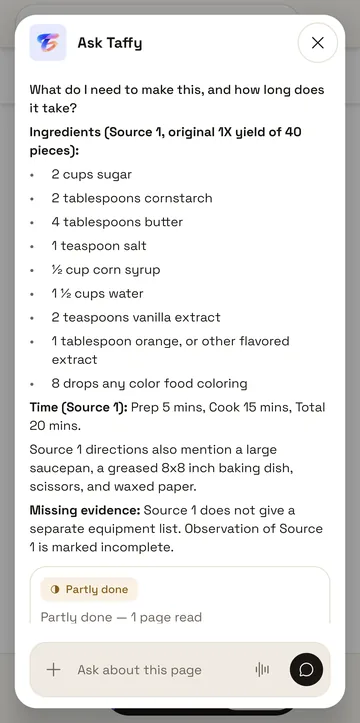
Taffy answers from the page in front of you and says where each part of the answer came from. When the page leaves something out, Taffy says that too.

Ask Taffy open over a recipe page. Taffy lists the ingredients and times from Source 1, notes that the page gives no equipment list, and marks the answer Partly done.
  1. Your question.
  2. The source behind each part of the answer.
  3. What the page didn't say.
  4. Partly done, because something was missing.

Hand over an errand

Tell Taffy what you want done across a few sites. Before it starts, Taffy says how many sites it may open and where the page text will go. The result puts the answer first, then what each page said.

Follow one errand
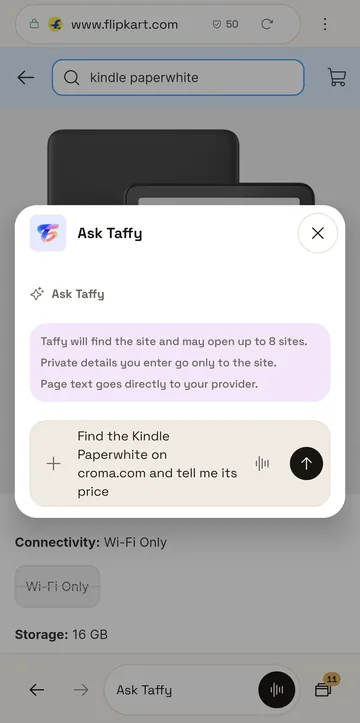
The Ask Taffy panel with a request to find a Kindle Paperwhite's price on croma.com. Above the box Taffy says it may open up to 8 sites, that private details go only to the site, and that page text goes directly to your provider.
Before it starts: what Taffy will do, and where your text goes.
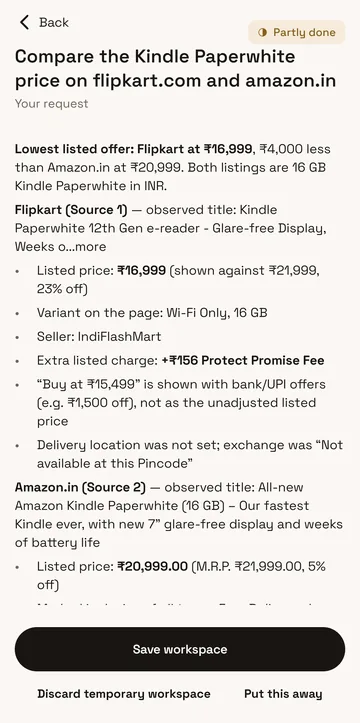
The result of comparing a Kindle Paperwhite on flipkart.com and amazon.in: the lowest listed offer, ₹16,999 at Flipkart, then each listing's details with its source, marked Partly done.
After: the lower price first, then each page's details and source.

Your provider, your key

TaffyGo has no AI service of its own. You connect one: paste an API key, sign in with a plan you already pay for, or add a provider by hand. Requests go straight from your phone to that provider.

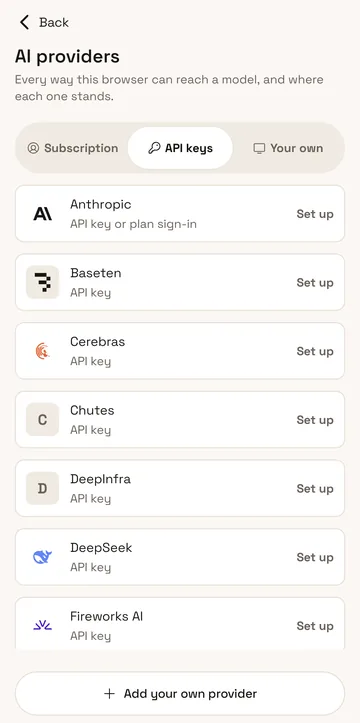
The AI providers screen on its API keys tab: Anthropic, Baseten, Cerebras, Chutes, DeepInfra, DeepSeek and Fireworks AI, each with Set up, and Add your own provider at the bottom.
  1. A plan you pay for, an API key, or a provider you add yourself.
  2. Each provider says what it needs from you.
  3. Anything not listed can be added by hand.

It stays on your phone

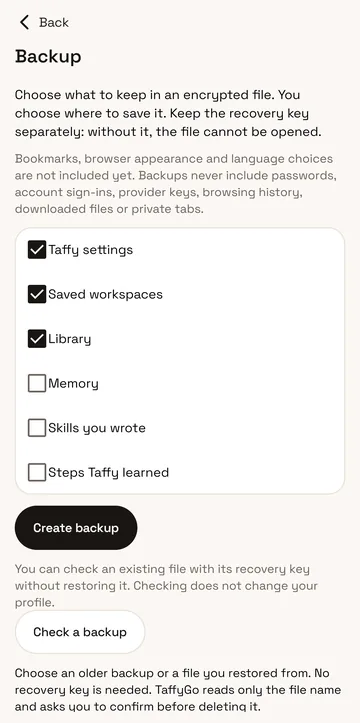
History, workspaces, saved sign-ins and your keys are kept on the phone. A backup is an encrypted file that you make and store yourself, and it never holds passwords, sign-ins, provider keys or browsing history.

Read the privacy policy
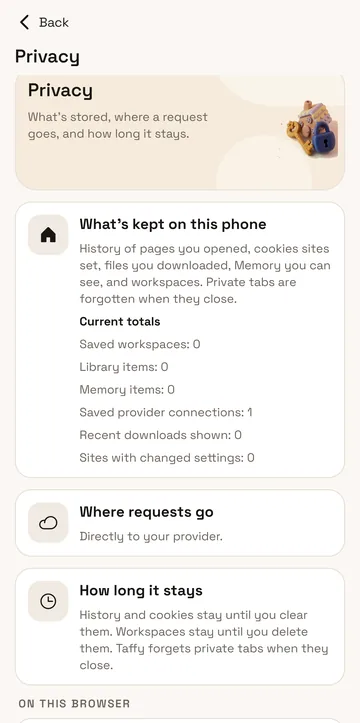
The Privacy screen: what's kept on this phone with current totals, where requests go (directly to your provider), and how long things stay.
Privacy: what's kept, the current totals, and where requests go.
The Backup screen: checkboxes for what goes into an encrypted file, a note that backups never include passwords, sign-ins, provider keys, browsing history, downloads or private tabs, and a Create backup button.
Backup: you pick what goes into the encrypted file.
Google PlayGet the APK
Painting: a person at a desk reads their phone while Taffy, a small winged character, stands beside their arm.

Taffy works when you ask

Taffy is the only assistant in TaffyGo. It reads the pages you point it at and tells you where their text will go before an errand starts. You can take over, pause or stop it at any step.

What you're installing

Price
Free. There is nothing to buy.
Account
None.
Our servers
None. Matterward Labs runs no server for TaffyGo.
AI
Optional, through the provider you connect, with your key or your plan.
Blocking
Ads and trackers, on by default, with a switch for each site.
Engine
Chromium
Phones
Android 10 or later, on a 64-bit ARM processor
Source
Mozilla Public License 2.0
github.com/satyajiit/taffygo

Questions

Get TaffyGo

TaffyGo 1.0 is on Google Play, and each release on GitHub carries the APK.

Both are free. The APK comes from GitHub Releases.

Read the source on GitHub

A copy from Google Play won't update from a GitHub APK, or the other way round, so pick one and keep to it.

Report a bug on GitHub